Skip to content

Purchase requisitions

Purchase requisition software that prices the request before it's sent.

Staff pick items from your item master, add quantities and a required date, and see the estimated total and the approval route before they submit. Each site can only request what it is approved to buy.

What is purchase requisition software?

Purchase requisition software replaces emailed or paper requests with a tracked internal form. A staff member lists the items, quantities and date needed, the system costs the request and sends it to the right approvers, and the approved requisition becomes the basis of a purchase order. Every step is recorded, so finance sees committed spend early.

How it works

Purchase requisitions, step by step.

  1. 01

    Pick from the item master

    The requester opens a new requisition and chooses items from the item master. The list shows only the items approved for their site.

  2. 02

    Add quantities and a date

    Each line takes a quantity and the date the goods are needed, so purchasing knows the deadline as well as the need.

  3. 03

    Code it and give a reason

    Every request carries a budget code and a reason. Both travel with the request into approval, the order and the audit log.

  4. 04

    Check the estimate and the route

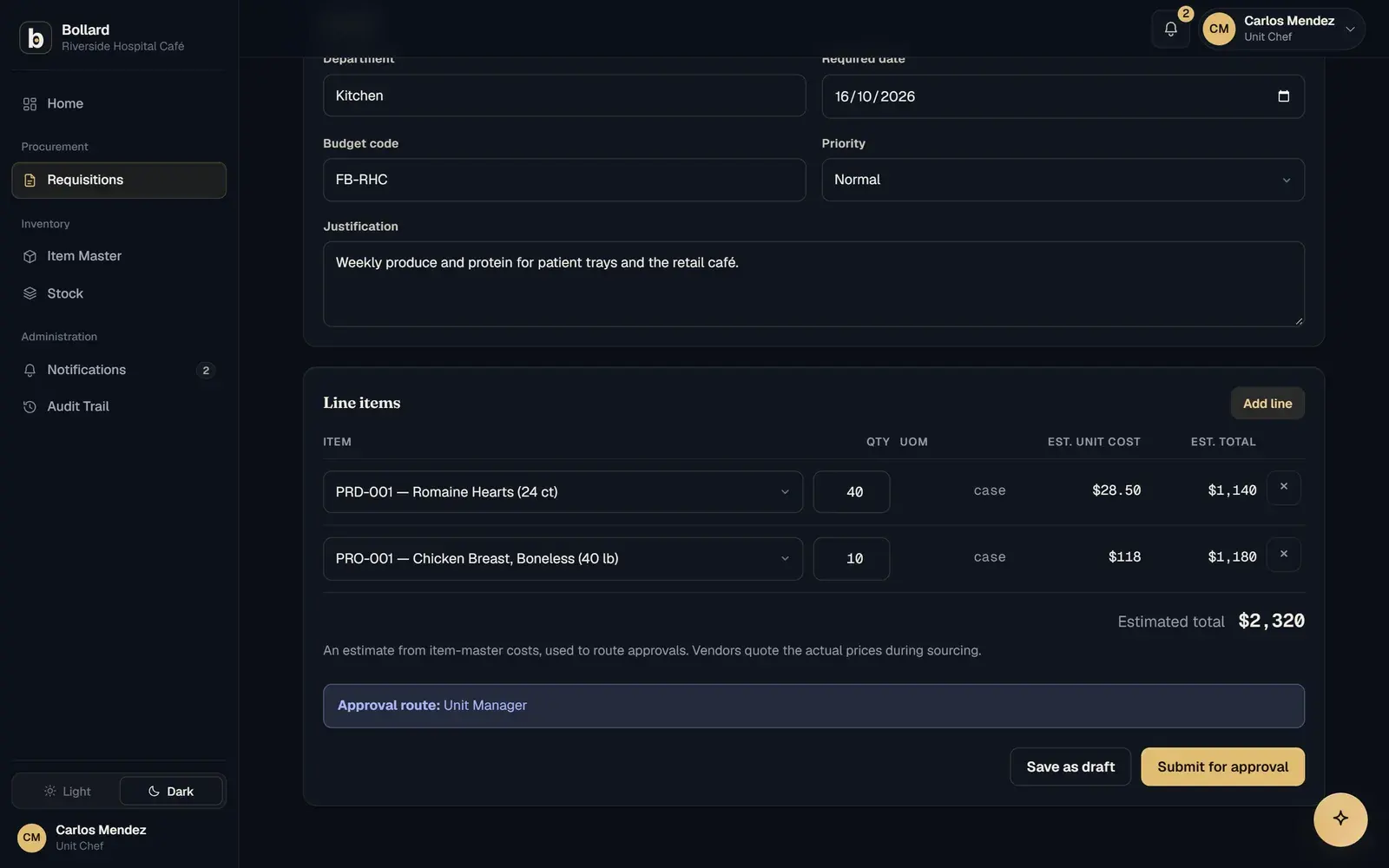
    Bollard estimates the total from item-master costs and shows who will approve it, in order, before anything is submitted.

  5. 05

    Save a draft or submit

    A request can be saved as a draft or submitted in under a minute. Once submitted, it moves into the approval chain.

A new requisition with line items, an estimated total and the approval route it will follow.

What does purchase requisition software do?

Purchase requisition software gives every internal purchase request the same shape and the same path. In Bollard, a requisition records what is needed, how many, by when, against which budget code and why. It then shows the person raising it the estimated cost and the approval route.

That matters most in organisations that buy across many sites. When requests arrive by email, phone and chat, procurement spends its time chasing missing details: which campus, what size, which budget. A structured requisition asks for those details once, at the start, from the person who knows them.

What should a purchase request form include?

A purchase request needs enough detail for someone else to approve and order it without going back to the requester. That means the item, the quantity, the date it is needed, the site, a budget or cost code and the reason for buying.

Bollard fills in what it can. Item descriptions and costs come from the item master, so the requester never types a price and the estimate uses the same figures purchasing works from. The budget code and reason are required fields, so an approver never sees a request without them.

  • Items chosen from the item master, limited to what the site may order
  • Quantity and required date on each line
  • Budget code and reason on every request
  • Estimated total and approval route shown before submission

How do requisitions keep spending within policy?

Requisitions keep spending within policy by stopping the wrong request before it is made. Each site sees only its approved items, every request needs a budget code and a reason, and the cost is visible up front. A requester who can see the total and the approvers can judge whether the request is reasonable before an approver has to.

Rules can go further where a sector needs them. In the higher-education configuration, grant and cost-centre codes are checked before a request is sent. For civil construction, every request is coded to a project and a cost code. For regional healthcare, item lists are limited by clinical role.

Purchase requisition vs purchase order: what is the difference?

A purchase requisition is an internal request to buy, and a purchase order is the document sent to a supplier once that request is approved. The requisition asks for permission. The PO commits the organisation to a price, terms and a delivery site, and the supplier works from it.

Keeping the two apart is a basic control. The person who needs the goods describes the need, someone with authority approves the spend, and purchasing chooses the supplier. In Bollard the approved requisition moves on to sourcing, so the order is raised from what was approved and nobody re-types it.

Where do requisitions sit in the request-to-payment loop?

Requisitions are the first of seven steps: request, approve, source, order, receive, match and pay. What the requester enters here sets the terms for everything after it.

The step before is the item master. Its costs produce the estimate and its site lists decide what can be asked for. Safock imports your catalog and vendors during setup, in days 4 to 7 of the first two weeks.

The step after is approval. The route the requester saw before submitting is the route the request takes, chosen by amount, site and role. Once approved, the request goes to sourcing and the purchase order with its budget code and reason attached.

Is a requisition system better than a spreadsheet or an ERP module?

A shared request sheet is live today but has no controls, and a typical ERP has controls after months of implementation. A requisition system configured to your process gives you the controls in about two weeks.

With a spreadsheet, approval happens by email and memory, prices are re-typed at each step, and sharing the file shares every site's requests with everyone who opens it. Anyone can overwrite a cell.

A typical ERP requisition screen uses the vendor's vocabulary, and its approval routing arrives after a long configuration project. Bollard uses your words for sites, roles and documents, so a head chef raises a Kitchen order and a site foreman raises a Site material requisition. Routing is set up during discovery.

Questions

Common questions.

Who raises a purchase requisition?

The person who needs the goods, or someone at the site on their behalf. In a university that might be a lab technician, in a restaurant group the head chef, on a jobsite the site foreman. Bollard is configured with your own role names, so the requester sees their title and their site's terms on the form.

Is a purchase requisition legally binding?

Generally not. A requisition is an internal document asking for approval to spend, and the supplier never sees it. The commitment to a supplier is the purchase order, which sets out price, terms and delivery. Contract law varies by country, so take legal advice on your own terms, but the internal and external split is standard practice.

Can staff see the approval route before they submit?

Yes. Before a requisition is submitted, Bollard shows the estimated total and the chain of approvers it will go to, worked out from the amount, the site and the requester's role. If something looks wrong, the requester can change the request or save it as a draft and check with their manager first.

Can each site have its own approved item list?

Yes. Requesters only see the items approved for their site, so a campus, unit or branch cannot order something outside its range by mistake. Which items each site can request is set up from your item master during onboarding, as part of the catalog import in the first two weeks.

How long does a requisition take to raise?

Under a minute for a typical request. The requester picks items from the item master, adds quantities and a required date, and enters a budget code and reason. Bollard fills in descriptions and estimated costs, then shows the route. The request can be submitted straight away or saved as a draft to finish later.

How long does it take to set up purchase requisitions?

Requisitions go live with the rest of the loop. Safock maps your terms in discovery (days 1 to 3), imports your catalog and vendors (days 4 to 7) and takes a pilot site live in days 8 to 14. That puts the first site on Bollard in about two weeks, with the rest of the network added after.

See Bollard set up for your operation.

Tell us how you buy and store today. We'll walk you through Bollard configured with your sites, roles and approval rules.

Book a demo
support@safock.com