Skip to content

Dashboard and audit

Procurement audit trail software that nobody can rewrite.

Every change across requests, approvals, orders, receipts and invoices is recorded with the user, the time and the before and after. The log is append-only. Alongside it, a dashboard shows value in flight across all seven stages and what needs each role's attention first.

What is procurement audit trail software?

Procurement audit trail software keeps a time-stamped record of every action taken on purchasing records: who created, approved, changed or paid what, and when. A strong audit trail records the value before and after each change and cannot be edited, so auditors and finance can rebuild any purchase from request to payment without relying on memory or email.

How it works

Audit trail, step by step.

  1. 01

    Every change is captured

    Raising, approving, rejecting, ordering, receiving, matching and paying all write an entry to the audit trail.

  2. 02

    Before and after recorded

    Each entry records the time, the user, the action, the record affected and its value before and after the change.

  3. 03

    Append-only, sealed in sequence

    Entries are only ever added. A correction becomes a new entry, and each entry is sealed to the one before it.

  4. 04

    Visibility follows the role

    Site managers see their site's records and head office and finance see the network, enforced with row-level security.

  5. 05

    The dashboard on top

    The dashboard shows value in flight across all seven stages and a needs-attention queue for each role, built from the same records.

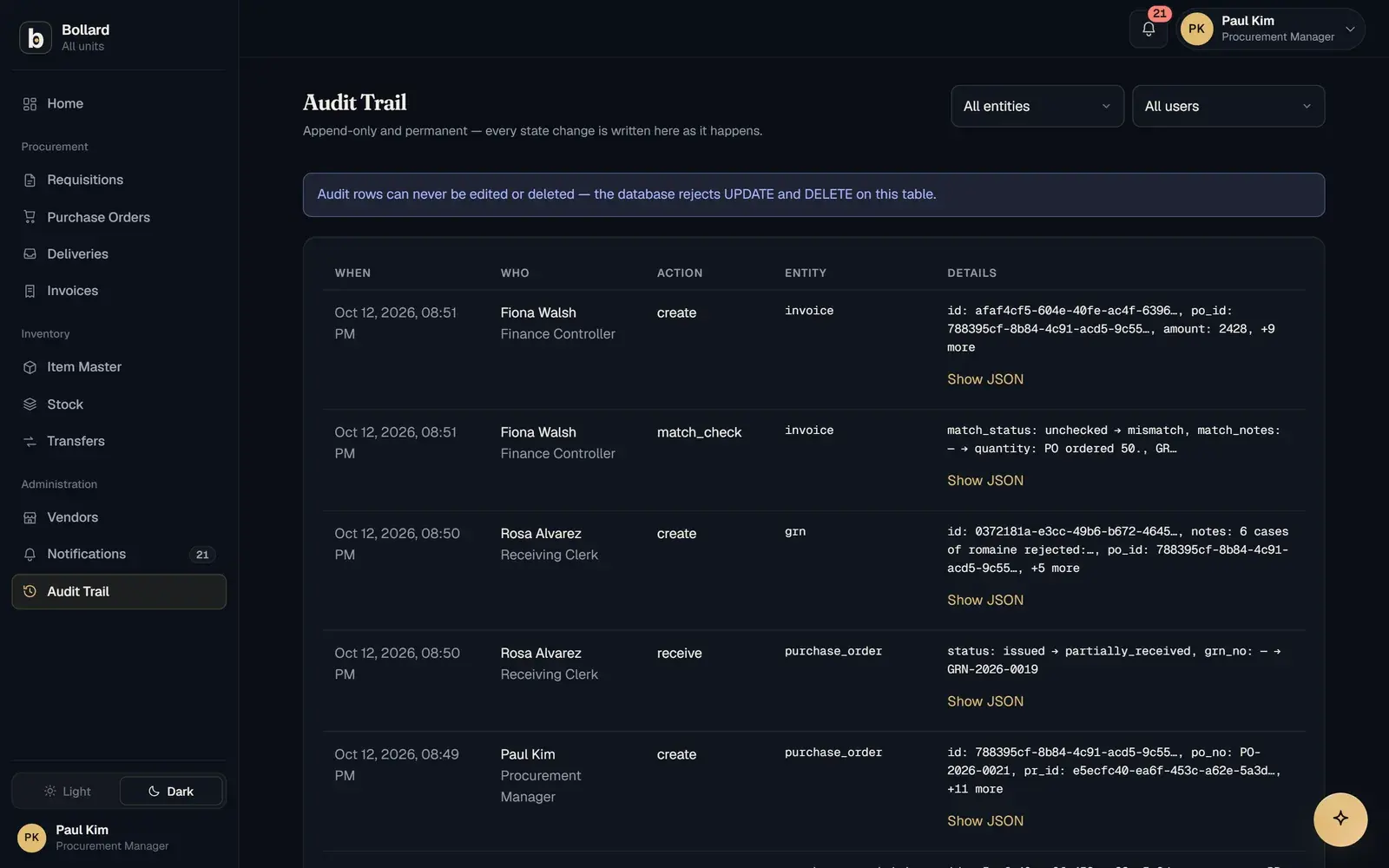
The audit trail listing changes by time, user, action and entity.

What should a procurement audit trail record?

Procurement audit trail software should record who did what, to which record and when, along with what the record looked like before and after the change. Bollard's audit trail captures each of those for every change, listed by time, user, action and entity.

An entry that only says a record was edited by a user tells an auditor that something changed, but not what. The before and after values answer the next question: was the price on this purchase order always this figure, or was it raised after the quote was chosen?

What is an immutable, append-only audit log?

An append-only log only ever adds entries. Nothing in it can be edited or deleted, so the history stays exactly as it was written.

In Bollard, a correction is a new entry that sits after the original, and each entry is sealed to the one before it. That matters in procurement, where the people who approve spend are also users of the system. A log that can be edited is weak evidence. An immutable audit log lets an auditor rely on the sequence they are reading.

What does the procurement dashboard show?

The procurement dashboard shows the value in flight at each of the seven stages and a needs-attention queue for each role.

Value in flight is money committed but not yet settled: requests waiting for approval, orders awaiting delivery, invoices waiting to match. Seeing it by stage tells finance where cash will be needed and tells procurement where purchases are stuck. The needs-attention queue puts the items waiting on each role at the top of their screen.

For questions the dashboard does not answer, the assistant takes plain-language questions, such as which invoices failed the match this month, and answers from live data within the user's role.

Who can see the audit trail and the dashboard?

Each person sees only the records their role allows. Site managers see their own site, and head office and finance see the network.

This is enforced with row-level security in the database, so no export, report or determined user can see more than they should. The same rule applies to the assistant, which only answers with what the user's role may see.

How does the audit trail cover purchase orders and the whole loop?

The audit trail runs underneath all seven steps of the loop: request, approve, source, order, receive, match and pay. Every step leaves its mark in the same place.

At the start, it holds the requisition with its budget code and reason. Through approval, every decision and every rejection remark. At ordering, the purchase order as raised from the chosen quote. Then come receipts with accepted and rejected quantities, the match verdict and the payment. An auditor following one purchase reads a single sequence instead of collecting emails, spreadsheets and module logs.

How does this compare with spreadsheet or ERP audit logs?

In a spreadsheet anyone can overwrite a cell, and in a typical ERP the logs are spread across modules. Bollard keeps one append-only log for the whole loop.

Spreadsheet version history can show that a file changed, but tying a change to an approval or a payment is detective work. Spreadsheets are also error-prone: field audits found errors in 91% of real business spreadsheets (Panko, 54 spreadsheets audited). ERP logs are usually sound within a module, but following one purchase can mean reading the purchasing, inventory and payables logs separately.

Questions

Common questions.

Why is an audit trail important in procurement?

An audit trail shows that each purchase followed the organisation's rules: who asked, who approved and against which limit, what was ordered at what price, what arrived and what was paid. Auditors use it to test controls, and finance uses it to settle disputes with suppliers. Without one, those answers depend on inboxes and memory.

Can an audit trail be edited?

In Bollard, it cannot. The audit trail is append-only: entries are added and never changed or removed. A correction to a record appears as a new entry after the original, with the before and after values, and each entry is sealed to the one before it, so the original history stays readable.

What is the difference between an audit trail and an audit log?

The terms are often used interchangeably. Strictly, an audit log is the list of recorded events, and an audit trail is the path you follow through that log to reconstruct one transaction, such as a single purchase from request to payment. In Bollard, the trail for any purchase reads as one ordered history.

Is an audit trail enough for regulatory compliance?

On its own, no. Compliance depends on your regulator, your policies and how you apply them, and Bollard does not claim to make any organisation compliant. What it gives your auditors is evidence: every change, with the user, the time and the before and after values, in a log nobody can edit.

How do auditors use a procurement audit trail?

Auditors usually pick a sample of purchases and follow each one from request to payment, checking that the approver had authority for the amount, that the price paid matches the order and that the goods were received. With every step in one append-only log, including the before and after values for each change, that walk-through reads as a single history.

What does value in flight mean?

Value in flight is the total value of purchases that have started the request-to-payment loop but not finished it. Bollard's dashboard splits it across seven stages, so finance can see how much is awaiting approval, ordered but not yet received, or received but not yet matched and paid.

See Bollard set up for your operation.

Tell us how you buy and store today. We'll walk you through Bollard configured with your sites, roles and approval rules.

Book a demo
support@safock.com