Skip to content

Platform

Request to payment, checked at every step.

Bollard covers the full procure-to-pay loop and multi-site inventory in one system. Each step hands a checked record to the next, so every order is held to the terms you agreed.

Follow one order from request to payment.

  1. 01

    Requisition

    Costed before anyone signs.

    The head chef at Harbour View builds the order from the item master. Bollard prices every line and shows who will approve it before it is sent.

    REQ-2026-0142

    Harbour View Bistro, Unit 04

    Draft, costed

    Item master lineQtyLine
    Romaine hearts, case of 2440$1,156.00
    Extra virgin olive oil, 5 L tin12$558.00
    Sourdough flour, 25 kg20$698.00
    Estimated total$2,412.00
    If submitted, routes to Unit manager, then District manager
  2. 02

    Two-key approval

    Two signatures, routed by the amount.

    At $2,412 the order is over the unit manager's $1,500 limit, so the district manager signs too. Finance only sees orders above $10,000.

    REQ-2026-0142

    Harbour View Bistro, Unit 04

    Approved, 2 of 2

    $2,412.00against this unit's approval limits

    • Unit managerApproved 09:14
    • District managerApproved 10:02
    • Finance directorNot required
  3. 03

    Quotation lock

    The winning quote becomes the price.

    Three suppliers quoted for the romaine. GreenLeaf's $28.50 a case is written onto the purchase order, and every later document is checked against it.

    REQ-2026-0142

    Harbour View Bistro, Unit 04

    PO-2026-0089 issued

    RFQ-2026-0042, romaine hearts, 40 cases

    • Apex Supplies$29.80
    • GreenLeaf Produce$28.50
    • Summit Food Distributors$32.00

    PO-2026-0089
    40 × $28.50 = $1,140.00, net 45, to the Unit 04 dock

    Price locked
  4. 04

    Dock inspection

    Counted at the door. Rejects set aside.

    Six cases arrive above temperature. The receiver rejects them on the receipt, so they go to quarantine instead of onto the bill. Two bags of flour are backordered and that line stays open.

    REQ-2026-0142

    Harbour View Bistro, Unit 04

    Received, 6 cases quarantined

    GRN-2026-0114, counted by J. Okafor at 07:40

    LineOrderedReceivedAcceptedRejected
    Romaine hearts4040346
    Olive oil, 5 L1212120
    Sourdough flour2 backordered, line open2018180

    Quarantine: 6 cases of romaine

    6.4 °C on arrival against a 5 °C limit. Kept off the payable.

  5. 05

    Three-way match

    The invoice has to agree with both.

    GreenLeaf bills 40 cases at $31.20. The order says $28.50 and the receipt says 34 accepted, so Bollard holds the payment and shows exactly why.

    REQ-2026-0142

    Harbour View Bistro, Unit 04

    Payment held

    CheckOrderReceiptInvoiceResult
    Unit price$28.50—$31.20
    Quantity403440
    VendorGreenLeafGreenLeafGreenLeaf

    Payment held

    Invoiced $1,248.00 for the romaine. Payable once corrected: $969.00, which is 34 accepted × $28.50.

Module by module

Seven modules, one record.

Everything in the story above, with the screens your team will use.

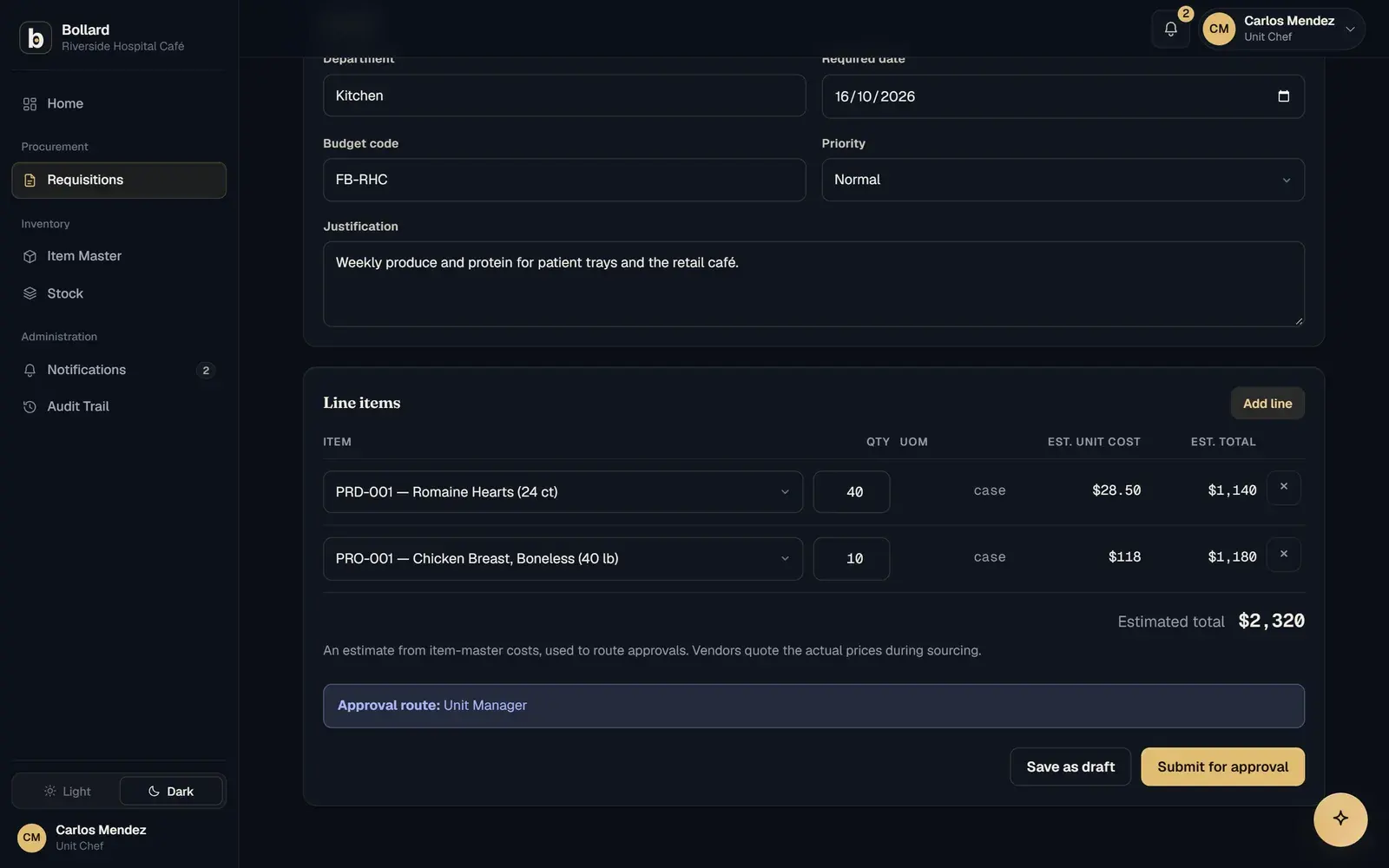
Requisitions

Requests start from the item master, with the cost up front.

Staff pick items, quantities and a required date. Bollard estimates the total from item-master costs and shows the approval route before the request is submitted.

  • Draft or submit in under a minute
  • Budget code and reason on every request
  • Only items approved for that site
More on requisitions
A new requisition with line items, an estimated total and its approval route.

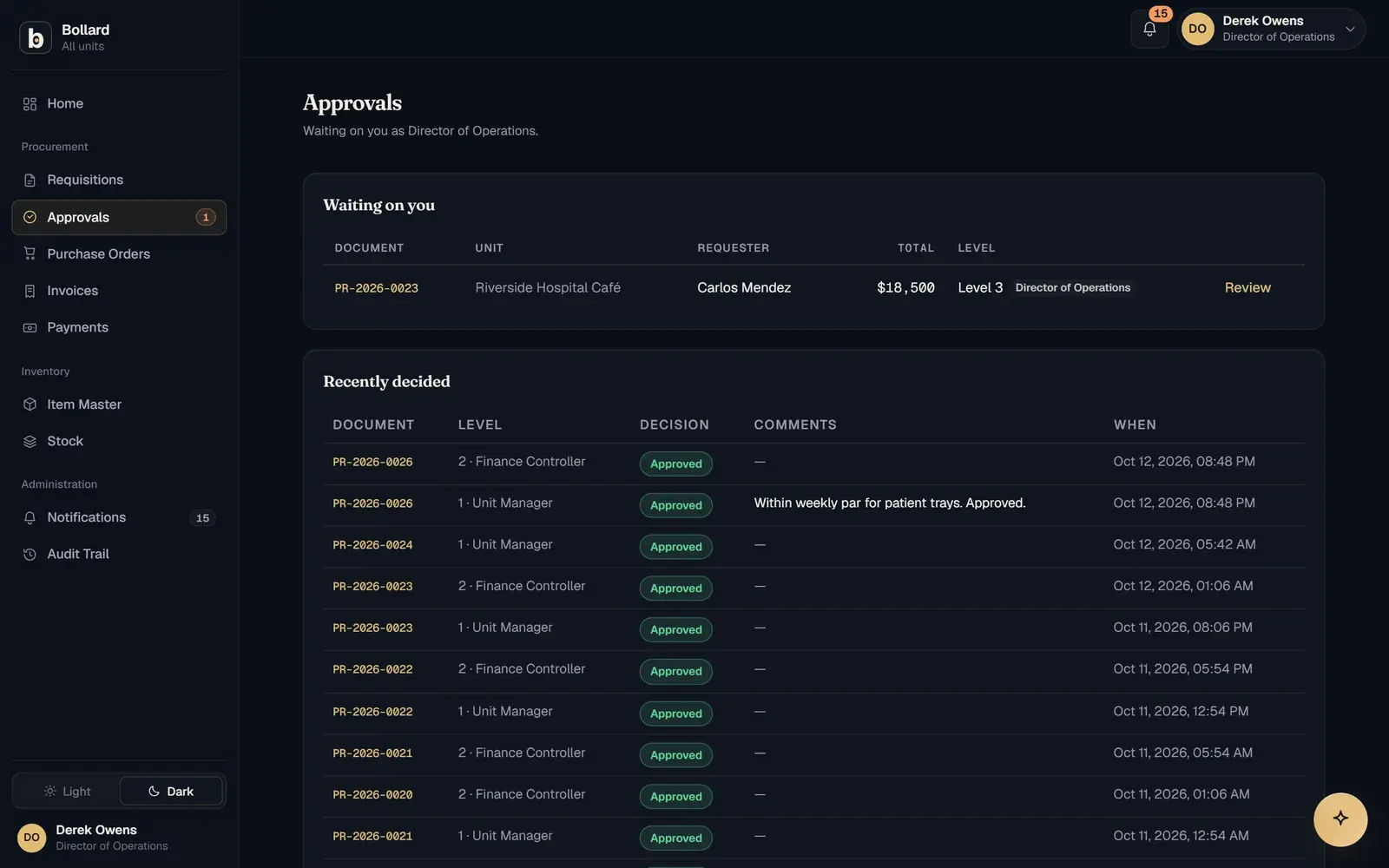
Approvals

The right approver, at the right amount.

Chains follow your rules by amount, site and role. Approvers see the full request on one screen, on a phone or a desk, and decide in one click.

  • Multi-level routing keyed to amount limits
  • A remark is required to reject
  • Every decision written to the audit log
More on approvals
The approvals queue showing pending requests by site and stage.

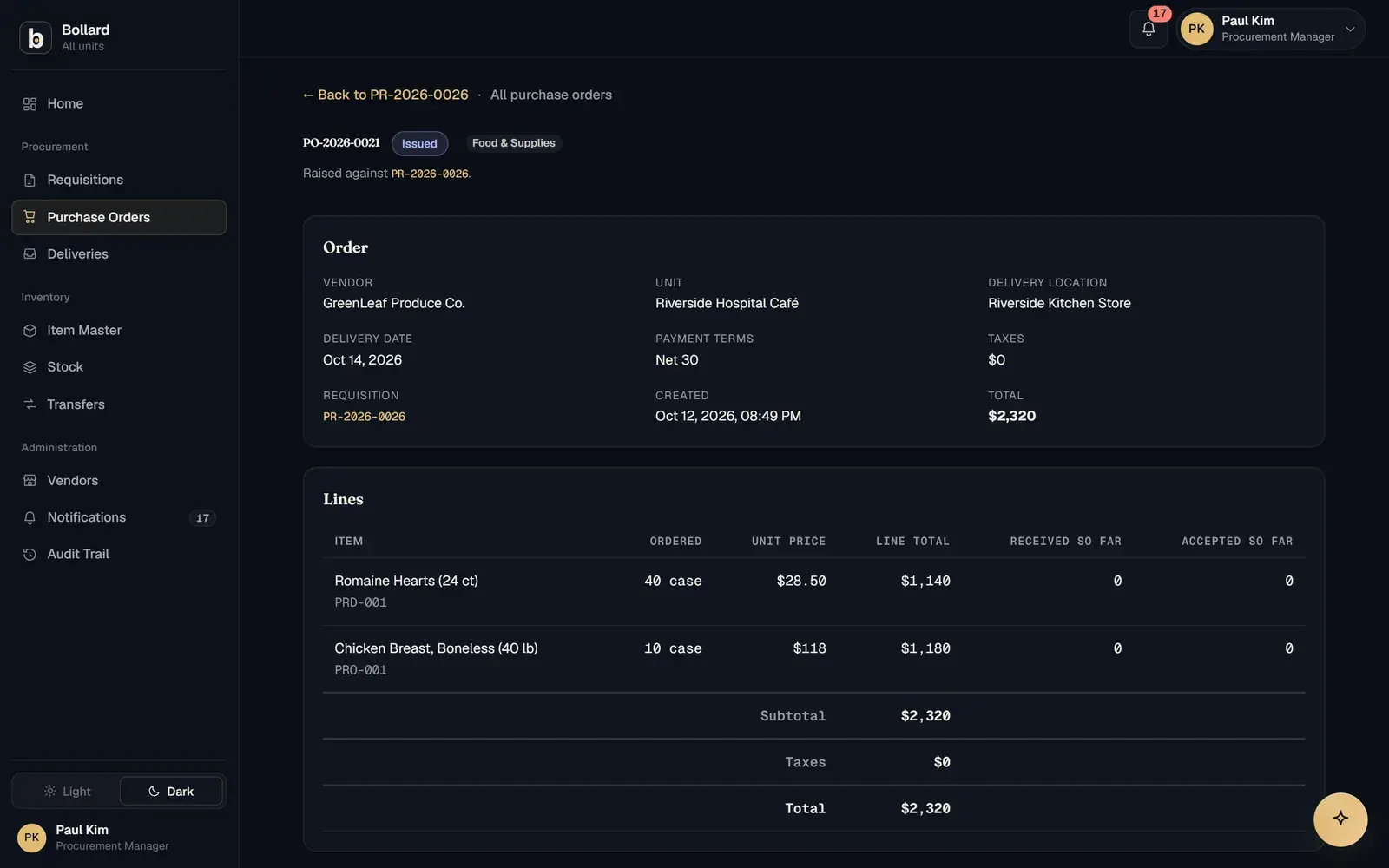
Sourcing and purchase orders

Quotes compared, then the price is locked on the PO.

Send RFQs, compare quotations side by side and raise the purchase order from the winner. The PO carries the agreed price, terms and delivery site.

  • Side-by-side quotation comparison
  • PO types for supplies, equipment and services
  • PDF sent straight to the supplier
More on sourcing and purchase orders
An issued purchase order with vendor, delivery location, terms and line prices.

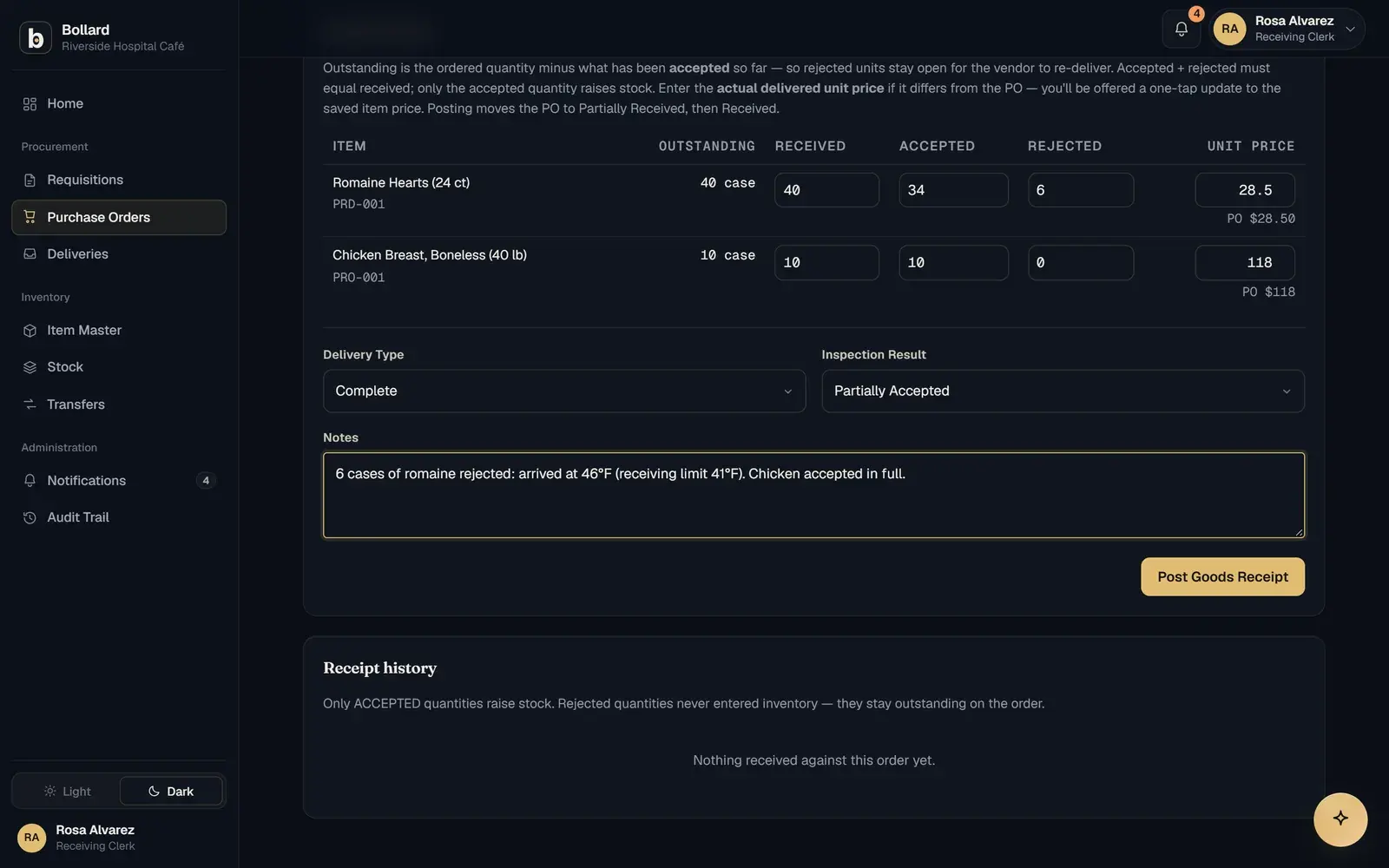
Receiving

What arrives is counted before anything is owed.

The store records received, accepted and rejected quantities against the PO. Partial deliveries stay open, and rejected stock never becomes billable.

  • Accepted and rejected per line, at the dock
  • Partial deliveries keep their balance open
  • Stock updates the moment goods are accepted
More on receiving
A goods receipt form with ordered, received, accepted and rejected quantities.

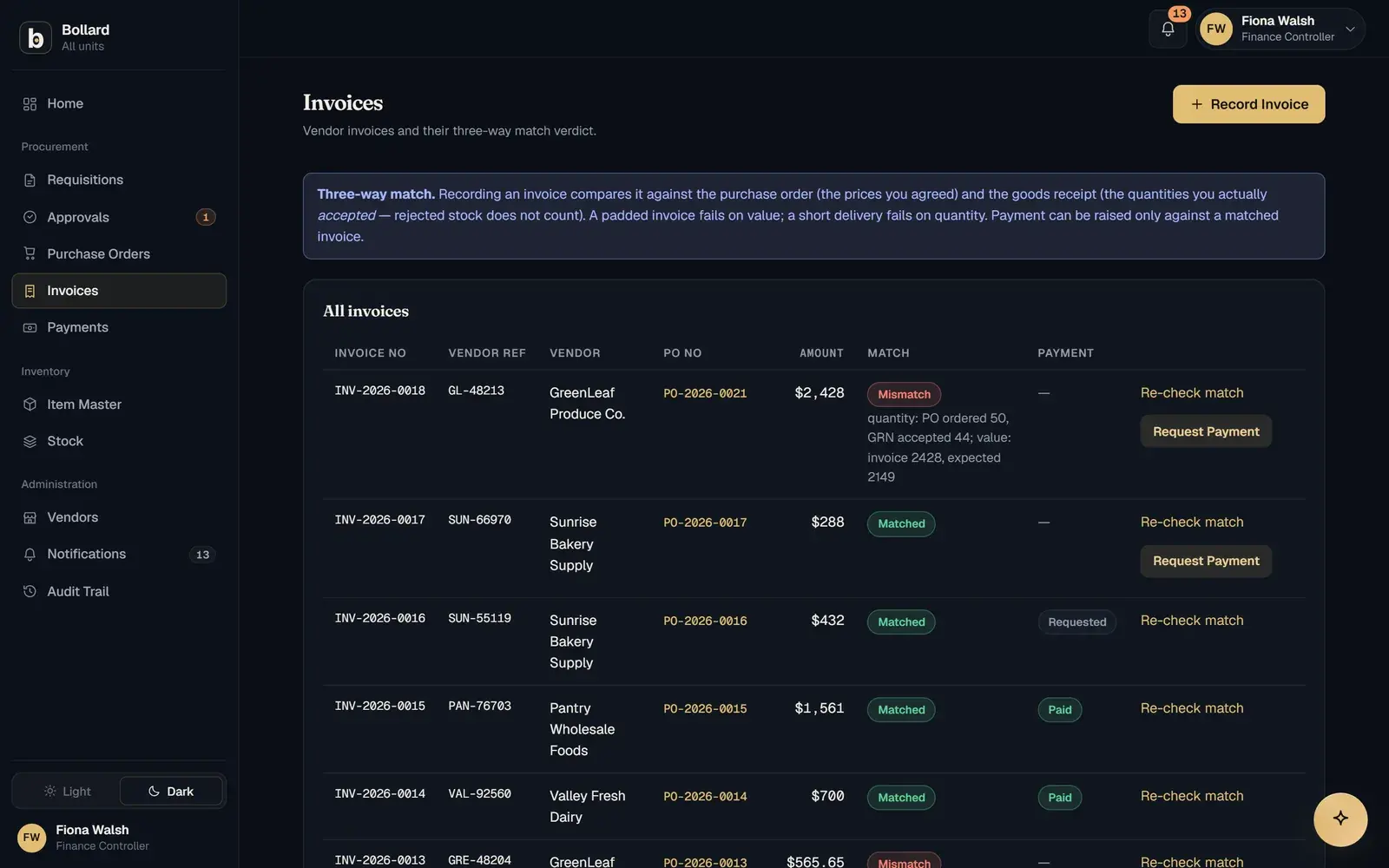
Three-way match

Payment waits until the invoice agrees.

Recording an invoice compares it with the order's prices and the receipt's accepted quantities. A padded price fails on value, a short delivery fails on quantity, and payment can only be raised against a match.

  • Checked line by line, not on the total
  • Rejected quantities excluded automatically
  • Payments only against matched invoices
More on three-way match
Invoices with their three-way match verdicts, one marked as a mismatch.

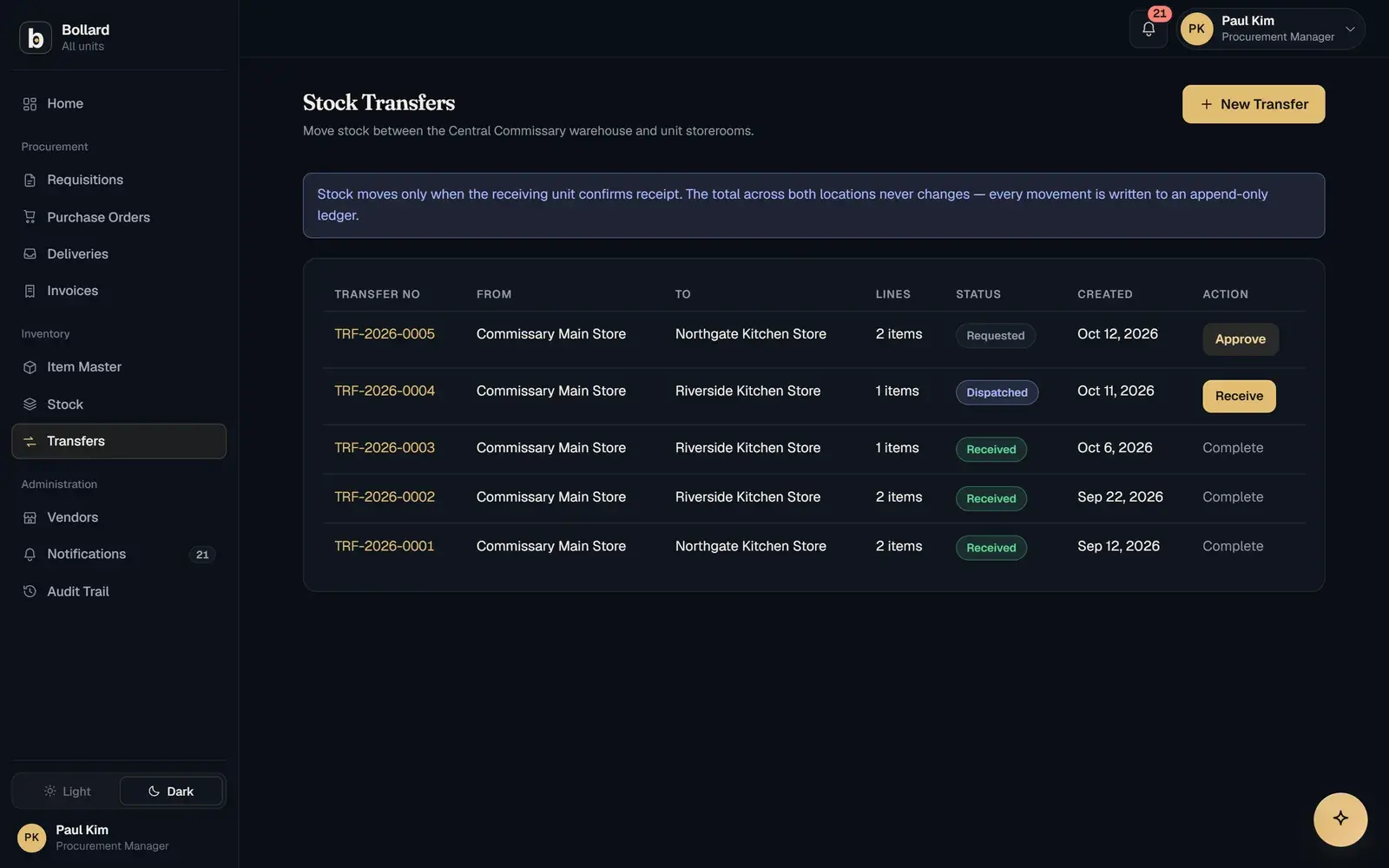
Inventory and transfers

Every store's stock, and everything moving between them.

Live levels per site with reorder points, plus transfers from the central store to each site, dispatched at one end and received at the other.

  • Live balances per location
  • Alerts when stock reaches its reorder point
  • Transfers confirmed on both ends
More on inventory and transfers
Stock transfers between the central store and individual sites.

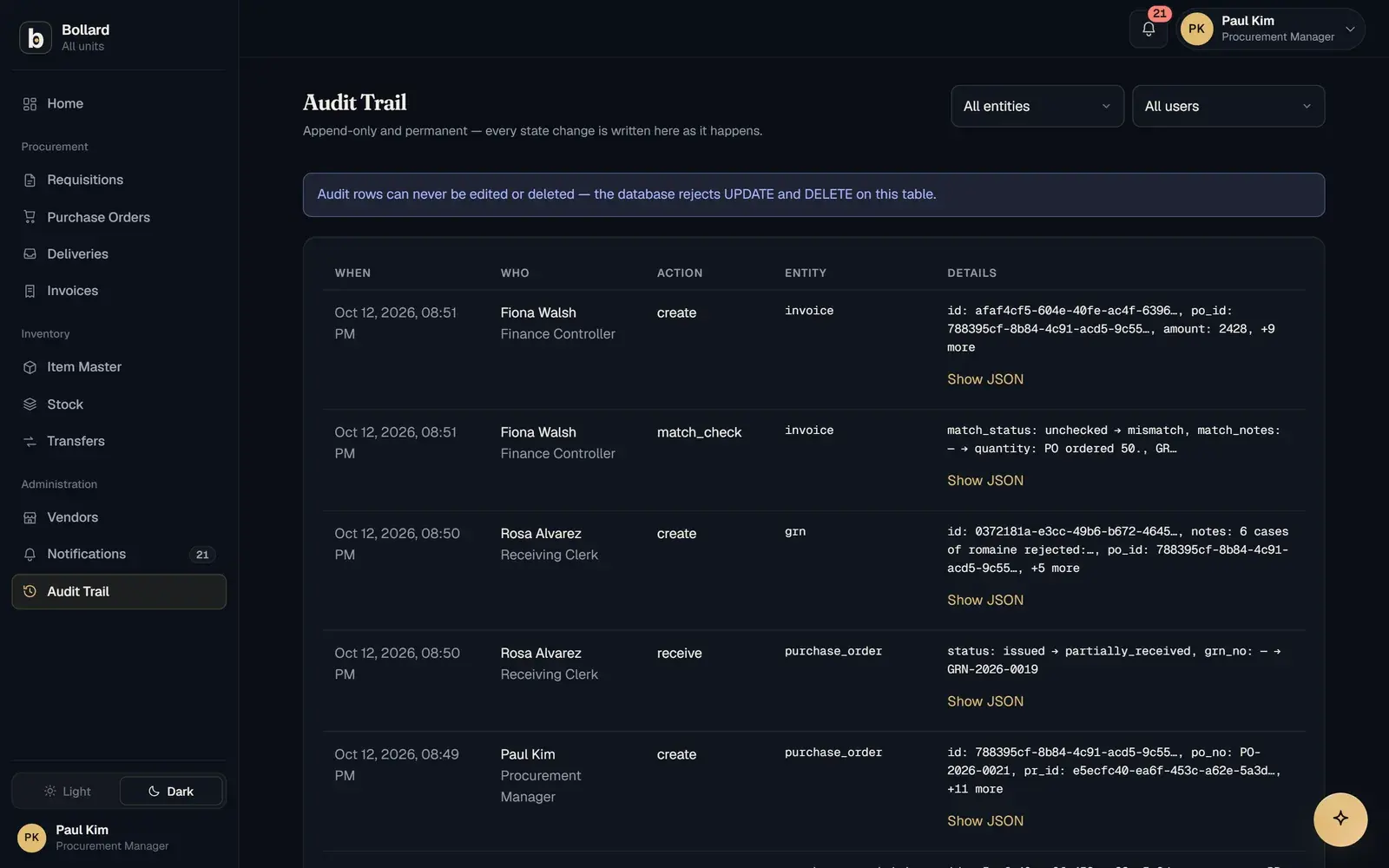
Dashboard and audit

The whole network at a glance, every change on record.

The dashboard shows value in flight by stage and what needs attention first. The audit trail records every change, with the before and after, and cannot be edited.

  • Value in flight across all seven stages
  • A needs-attention queue for each role
  • Before-and-after for every change
More on dashboard and audit
The audit trail listing changes by time, user, action and entity.

Held by the ledger

Nobody can see what isn't theirs, or rewrite what's done.

Screens can hide a button. Bollard writes these rules into the database underneath, so no export, report or determined user can get around them. Try both.

Who can see it

Everyone works from the same records, but each person sees only their part. A unit manager sees their unit, finance sees the network, and another company sees nothing of yours.

Viewing as

Unit managers see their own unit's orders, and nothing else.

Orders visible to Unit manager, Harbour View: 2 of 6
OrderSiteTotalStatus
REQ-0138Harbour View$1,820.00Approved
REQ-0142Harbour View$2,412.00Approved

2 orders visible

Hidden rows are drawn here for the demo. A real view never lists them.

Who can change it

Once something is recorded, it stays as it was. Corrections are added as new entries, never written over old ones, and each entry is sealed to the one before it.

Order historynow ---- -- -- --:--:--.--- UTC

  1. R. Mensah approved REQ-2026-0142

    14 Oct, 09:14:07.312

  2. D. Ferreira approved REQ-2026-0142

    14 Oct, 10:02:51.086

  3. A. Lindqvist issued at $28.50 a case PO-2026-0089

    14 Oct, 11:30:19.640

  4. J. Okafor received 34 of 40 cases GRN-2026-0114

    15 Oct, 07:40:02.957

$
Try 31.20, the price GreenLeaf billed.

Every entry is sealed to the one before it. Try changing the agreed price above.

Compared

Fitted like custom software, steady like an ERP.

Most multi-site operators run on shared spreadsheets or a heavy ERP. Here is where each one gives way.

CapabilityShared spreadsheetsLegacy ERPBollard
Your words for sites, roles and documentsPartly: Whatever each tab is calledNo: The vendor's vocabularyConfigured per customer
Approval routing by amount, site and roleNo: Email and memoryYes: After a long configuration projectSet up in discovery
Agreed price carried from quote to PO to invoiceNo: Re-typed at each stepPartly: Often a separate moduleLocked on the PO
Rejected goods kept off the billNo: Relies on someone noticingPartly: Depends on the receiving setupRecorded per line at the dock
Payment blocked until the invoice matchesNo: Manual comparisonYes: Usually, once configuredEnforced in the database
Each site sees only its own recordsNo: Share the file, share everythingYes: Through role designRow-level security
An audit trail nobody can editNo: Anyone can overwrite a cellPartly: Logs spread across modulesAppend-only log
Time to the first live siteYes: Today, with no controlsNo: Months of implementationAbout two weeks

Walk through your own workflow.

See your sites, approval routes and item master running on Bollard, and one of your own orders matched end to end.

Book a demo
support@safock.com